COMPARISON / OPERATIONAL DECISION

Your operation decides
which system you need.

If your current Wasi workflow works, changing for its own sake creates no value. FARO 0.5 is a good fit when you want to connect confirmed information, inventory, your website, clients and content with hands-on support. This comparison concerns the complementary real estate solution; voice and WhatsApp agents can be purchased with their own scope.

CRITERION 01 NO SHORTCUTS

A system does not win on its feature list.

  1. 01Preserve what already works.
  2. 02Make visible what is being lost today.
  3. 03Switch only with a defined outcome.

TWO VALID DECISIONS

The best system is the one that eliminates your actual bottleneck.

We do not judge Wasi by features we cannot confirm. We evaluate your current operation and separately show what FARO 0.5 does offer today.

STAYING MAY MAKE SENSE

When continuity is the priority.

  • Your current workflow covers the important tasks.
  • The team already knows where to work and does not lose information.
  • You do not need to change your website or reorganize operations.
  • The cost and effort of transition have no clear return.
EVALUATING FARO MAY MAKE SENSE

When connection is the priority.

  • You want your own website powered by your inventory.
  • You need documents and confirmed facts to support what is published.
  • You want to see visits, leads, assignees and next actions.
  • You prefer guided implementation to configuring everything yourself.

SIX QUESTIONS

Compare your case, not two pages of marketing.

The Wasi column is a checklist for your actual account. The FARO column describes capabilities available in version 0.5.

AREACHECK IN YOUR CURRENT WASIFARO 0.5 TODAY
01Inventory

Review the fields, statuses, photos and export options you actually use.

Upload, correct, publish or pause properties with photos and quality control.

02Information

Locate the documents and facts your team consults before publishing.

My Information extracts facts from documents or text for a person to confirm, correct or reject.

03Your own website

Confirm the domain, editorial control, technical scope and what changes when the contract ends.

My Website guides nine decisions, displays a preview and lets you publish on your own domain.

04Performance

Check which visits, forms and sources you can view without building a separate report.

Shows visits, leads and the pages that generated each inquiry.

05Teamwork

Validate users, permissions and responsibilities against how your team works today.

Separates accounts and lets you manage members, roles, permissions and assignees.

06Sales materials

Note which materials you still create outside the system and how much work they require.

Create shareable presentations and content pieces from previously confirmed information.
AVAILABLE PRODUCT

FARO 0.5 can be see before you believe.

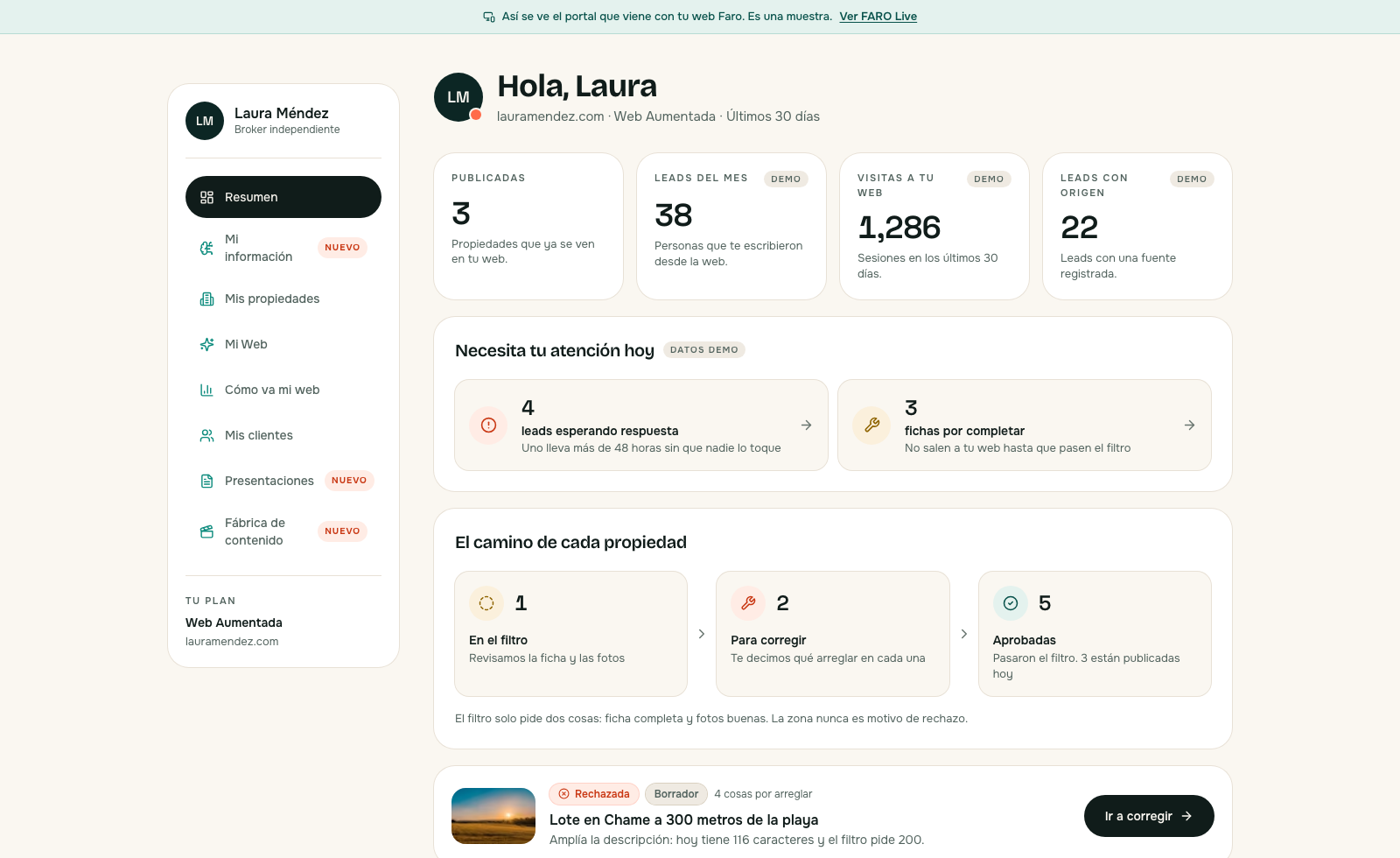
The view faithfully reproduces the interface and uses sample data. In FARO Live, you can explore information, inventory, My Website, performance, clients and content without registering.

Explore FARO Live
AvailableFARO 0.5 product
ManagedSales CRM and WhatsApp bot
VisionFARO Full and native automation
FARO PORTAL / SUMMARY SAMPLE DATA
Summary of a demo account in FARO 0.5
A faithful representation of the FARO 0.5 interface, prepared with modules available today and demonstration data.
REVIEW PROCESS3

steps to define a migration

MIGRATION WITH DEFINED SCOPE

First we audit. Then we moves.

Before quoting, we review the available file, images, statuses, contacts and data requiring cleanup. Scope depends on source quality and available access.

01Catalog

What exists and in which format.

02Validate

What is kept, corrected or discarded.

03Plan

Scope, owners and cutoff date.

DECISION SESSION

Bring your operation, not a list of features.

In 30 minutes, we review what already works, what you need to connect and whether FARO adds enough value to justify the change.

  • Without assuming you need to migrate.
  • With FARO 0.5 open during the conversation.
  • With boundaries between product, integration and vision.
WhatsApp +507 6347-1237
We will write to coordinate the review. Data processed in accordance with Law 81 of 2019.

FREQUENTLY ASKED QUESTIONS

Before change anything.

01Does FARO automatically replace what I currently have in Wasi?

No. First we review the workflow that already works, the information available for export and what you actually want to change. If the current system serves your operation well, keeping it may be the right decision.

02What can be migrated to FARO?

It depends on the files and access available in your operation. The FARO team reviews inventory, images, statuses and contacts before proposing a scope. Each migration is validated separately.

03Are the CRM and WhatsApp bot native FARO 0.5 modules?

No. FARO 0.5 includes clients, assigned owners and next actions within the operation. The sales CRM and WhatsApp bot are services managed by the FARO team. Under the Augmented Website offering, USD 99 per month replaces USD 49 and adds the managed bot, plus taxes and messaging under the applicable terms. This is a separate offering from the current tool-based plans.

04Can I see FARO before making a decision?

Yes. FARO Live shows faithful representations of the version 0.5 interface with demonstration data. You can also book a session to review your situation without assuming migration is the right answer.

FARO vs. Wasi: choose according to your operation